

system_one / systemOne calls emit decision spans.
The integration is compatible with:
- TypeSafe Python SDK
typesafe-sdk >= 0.6.0 - TypeSafe TypeScript/JavaScript SDK
@typesafe-ai/sdk >= 0.6.0
TypeSafeClient.system_one in Python and TypeSafeClient.systemOne in TypeScript). Vercel AI Gateway experimental_evaluate is not instrumented in this release; that path can be added when AI SDK evaluate is stable.
Get started
1
Install OpenLIT
Open your command line or terminal and run:
- Python
- TypeScript
2
Initialize OpenLIT in your Application
- Python
- Typescript
- Zero Code Instrumentation
- One-Line Instrumentation
Perfect for existing applications - no code modifications needed:
- Via CLI Arguments
- Via Environment Variables
Perfect for: Legacy applications, production systems where code changes need approval, quick testing, or when you want to add observability without touching existing code.
YOUR_OTEL_ENDPOINT with the URL of your OpenTelemetry backend, such as http://127.0.0.1:4318 if you are using OpenLIT and a local OTel Collector.To send metrics and traces to other Observability tools, refer to the supported destinations.For more advanced configurations and application use cases, visit the OpenLIT Python repository or OpenLIT Typescript repository.What is captured
Each System One call creates a CLIENT span nameddecision {model} (for example decision jev-1.13.0). That follows the OpenTelemetry GenAI span-name format {gen_ai.operation.name} {gen_ai.request.model}. The operation is decision rather than chat so Jev traces are not auto-evaluated as chat completions. Provider is gen_ai.provider.name=typesafe. Shared inference attributes match OpenAI chat spans where they apply. Sampling knobs such as temperature are omitted because System One has no such request fields.
Instrumentor aliases: typesafe, jev, typesafe-ai, typesafe_sdk.
Set TYPESAFE_API_KEY in the environment. Filter traces on span name decision jev-1.13.0 (or decision jev-latest).
Example
Callopenlit.init() once. Keep using the official TypeSafe client. No extra OpenTelemetry setup in application code.
- Python
- TypeScript
AsyncTypeSafeClient.system_one is instrumented the same way in Python.
Configuration
By default OpenLIT records metadata, usage, and cost but not the content of your System One calls. Enablecapture_message_content (captureMessageContent in TypeScript) to include the state and questions on the span, for example while debugging. Leave it off if your inputs contain sensitive data.
- Python
- TypeScript
OTEL_INSTRUMENTATION_GENAI_CAPTURE_MESSAGE_CONTENT=true. See SDK configuration for every option.
Use Jev as an OpenLIT judge
TypeSafe Jev is also an evaluation provider in the OpenLIT UI. Select TypeSafe and a Jev model under Evaluations → Configuration, store the API key in Vault, and keep your existing evaluation types. Issue types map to noul; quality types map to score. See Evaluators. Jev is not available in Chat or OpenGround.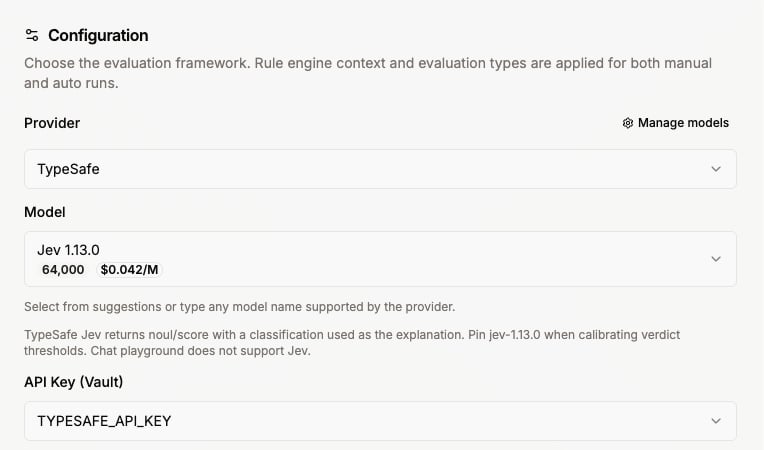
jev-1.13.0 when a verdict threshold depends on a model version. jev-latest moves when TypeSafe ships a release.
Quickstart: LLM Observability
Production-ready AI monitoring setup in 2 simple steps with zero code changes
Configuration
Configure the OpenLIT SDK according to your requirements.
Evaluators
Use TypeSafe Jev as the in-product evaluation judge
Destinations
Send telemetry to Datadog, Grafana, New Relic, and other observability stacks