> ## Documentation Index
> Fetch the complete documentation index at: https://docs.openlit.io/llms.txt
> Use this file to discover all available pages before exploring further.
# Get started with AI Observability
> Start monitoring your AI applications with the OpenLIT SDK in a few steps
OpenLIT automatically instruments LLMs, VectorDBs, MCP, and frameworks by default.
This guide demonstrates how to implement real-time cost tracking, token usage monitoring, hallucination detection, and latency optimization for your AI applications with OpenTelemetry traces and metrics.
 ```mermaid theme={null}
flowchart TB;
subgraph " "
direction LR;
subgraph " "
direction LR;
OpenLIT_SDK[OpenLIT SDK] -->|Sends Traces & Metrics| OTC[OpenTelemetry Collector];
OTC -->|Stores Data| ClickHouseDB[ClickHouse];
end
subgraph " "
direction RL;
OpenLIT_UI[OpenLIT] -->|Pulls Data| ClickHouseDB;
end
end
```
```shell theme={null}
git clone git@github.com:openlit/openlit.git
```
From the root directory of the [OpenLIT Repo](https://github.com/openlit/openlit), Run the below command:
```shell theme={null}
docker compose up -d
```
Prefer Kubernetes, or already have ClickHouse/OpenTelemetry Collector running? See [Self-Host OpenLIT](/latest/openlit/installation) for Helm charts and other deployment options.
```shell theme={null}
pip install openlit
```
```shell theme={null}
npm install openlit
```
```python theme={null}
import openlit
openlit.init(otlp_endpoint="http://127.0.0.1:4318")
```
Examples:
```python OpenAI theme={null}
from openai import OpenAI
import openlit
openlit.init(otlp_endpoint="http://127.0.0.1:4318")
client = OpenAI(
api_key="YOUR_OPENAI_KEY"
)
chat_completion = client.chat.completions.create(
messages=[
{
"role": "user",
"content": "What is LLM Observability?",
}
],
model="gpt-3.5-turbo",
)
```
```python Anthropic theme={null}
import os
from anthropic import Anthropic
import openlit
openlit.init(otlp_endpoint="http://127.0.0.1:4318")
client = Anthropic(
# This is the default and can be omitted
api_key=os.environ.get("ANTHROPIC_API_KEY"),
)
message = client.messages.create(
max_tokens=1024,
messages=[
{
"role": "user",
"content": "Hello, What is LLM Observability?",
}
],
model="claude-3-opus-20240229",
)
```
```python Cohere theme={null}
import cohere
import openlit
openlit.init(otlp_endpoint="http://127.0.0.1:4318")
co = cohere.Client(
api_key="YOUR_API_KEY",
)
chat = co.chat(
message="hello world!",
model="command"
)
```
```python LiteLLM theme={null}
from litellm import completion
import os
import openlit
openlit.init(otlp_endpoint="http://127.0.0.1:4318")
os.environ["HUGGINGFACE_API_KEY"] = "huggingface_api_key"
# e.g. Call 'WizardLM/WizardCoder-Python-34B-V1.0' hosted on HF Inference endpoints
response = completion(
model="huggingface/WizardLM/WizardCoder-Python-34B-V1.0",
messages=[{ "content": "Hello, how are you?","role": "user"}],
api_base="https://my-endpoint.huggingface.cloud"
)
```
```python Langchain theme={null}
from langchain_core.messages import HumanMessage, SystemMessage
import openlit
openlit.init(otlp_endpoint="http://127.0.0.1:4318")
from langchain_openai import ChatOpenAI
model = ChatOpenAI(model="gpt-4o-mini")
messages = [
SystemMessage(content="Translate the following from English into Italian"),
HumanMessage(content="hi!"),
]
model.invoke(messages)
```
```python Ollama theme={null}
import ollama
import openlit
openlit.init(otlp_endpoint="http://127.0.0.1:4318")
response = ollama.chat(model='llama3.1', messages=[
{
'role': 'user',
'content': 'Why is the sky blue?',
},
])
```
Add the following two lines to your application code:
```python theme={null}
import openlit
openlit.init()
```
Run the following command to configure the OTEL export endpoint:
```shell theme={null}
export OTEL_EXPORTER_OTLP_ENDPOINT = "http://127.0.0.1:4318"
```
Examples:
```python OpenAI theme={null}
from openai import OpenAI
import openlit
openlit.init()
client = OpenAI(
api_key="YOUR_OPENAI_KEY"
)
chat_completion = client.chat.completions.create(
messages=[
{
"role": "user",
"content": "What is LLM Observability?",
}
],
model="gpt-3.5-turbo",
)
```
```python Anthropic theme={null}
import os
from anthropic import Anthropic
import openlit
openlit.init()
client = Anthropic(
# This is the default and can be omitted
api_key=os.environ.get("ANTHROPIC_API_KEY"),
)
message = client.messages.create(
max_tokens=1024,
messages=[
{
"role": "user",
"content": "Hello, What is LLM Observability?",
}
],
model="claude-3-opus-20240229",
)
```
```python Cohere theme={null}
import cohere
import openlit
openlit.init()
co = cohere.Client(
api_key="YOUR_API_KEY",
)
chat = co.chat(
message="hello world!",
model="command"
)
```
```python LiteLLM theme={null}
from litellm import completion
import os
import openlit
openlit.init()
os.environ["HUGGINGFACE_API_KEY"] = "huggingface_api_key"
# e.g. Call 'WizardLM/WizardCoder-Python-34B-V1.0' hosted on HF Inference endpoints
response = completion(
model="huggingface/WizardLM/WizardCoder-Python-34B-V1.0",
messages=[{ "content": "Hello, how are you?","role": "user"}],
api_base="https://my-endpoint.huggingface.cloud"
)
```
```python Langchain theme={null}
from langchain_core.messages import HumanMessage, SystemMessage
import openlit
openlit.init()
from langchain_openai import ChatOpenAI
model = ChatOpenAI(model="gpt-4o-mini")
messages = [
SystemMessage(content="Translate the following from English into Italian"),
HumanMessage(content="hi!"),
]
model.invoke(messages)
```
```python Ollama theme={null}
import ollama
import openlit
openlit.init()
response = ollama.chat(model='llama3.1', messages=[
{
'role': 'user',
'content': 'Why is the sky blue?',
},
])
```
```bash theme={null}
# Install OpenLIT
pip install openlit
# Configure via CLI arguments
openlit-instrument \
--service-name my-ai-app \
--environment production \
--otlp-endpoint http://127.0.0.1:4318 \
python your_app.py
```
```bash theme={null}
# Configure via environment variables
export OTEL_SERVICE_NAME=my-ai-app
export OTEL_DEPLOYMENT_ENVIRONMENT=production
export OTEL_EXPORTER_OTLP_ENDPOINT=http://127.0.0.1:4318
# Run with zero code changes
openlit-instrument python your_app.py
```
```typescript theme={null}
import Openlit from "openlit"
Openlit.init({ otlpEndpoint: "http://127.0.0.1:4318" })
```
Examples:
```typescript OpenAI theme={null}
import Openlit from "openlit"
Openlit.init({ otlpEndpoint: "http://127.0.0.1:4318" })
async function main() {
const OpenAI = await import("openai").then((e) => e.default);
const openai = new OpenAI({
apiKey: process.env.OPENAI_API_KEY,
});
const completion = await openai.chat.completions.create({
model: "gpt-3.5-turbo",
messages: [{ role: "user", content: "What is LLM Observability?" }],
});
console.log(completion?.choices?.[0]);
}
main();
```
```typescript Anthropic theme={null}
import Openlit from "openlit"
Openlit.init({ otlpEndpoint: "http://127.0.0.1:4318" })
async function main() {
const Anthropic = await import("@anthropic-ai/sdk").then((e) => e.default);
const anthropic = new Anthropic({
apiKey: process.env.ANTHROPIC_API_KEY,
});
const message = await anthropic.messages.create({
max_tokens: 1024,
messages: [{ role: "user", content: "Hello, What is LLM Observability?" }],
model: "claude-3-opus-20240229",
});
console.log(message);
}
main();
```
```typescript Cohere theme={null}
import Openlit from "openlit"
Openlit.init({ otlpEndpoint: "http://127.0.0.1:4318" })
async function main() {
const { CohereClient } = await import("cohere-ai");
const cohere = new CohereClient({
token: process.env.COHERE_API_KEY,
});
const chat = await cohere.chat({
message: "hello world!",
model: "command",
});
console.log(chat);
}
main();
```
```typescript Langchain theme={null}
import Openlit from "openlit"
Openlit.init({ otlpEndpoint: "http://127.0.0.1:4318" })
async function main() {
const { ChatOpenAI } = await import("@langchain/openai");
const { HumanMessage, SystemMessage } = await import("@langchain/core/messages");
const model = new ChatOpenAI({ model: "gpt-4o-mini" });
const messages = [
new SystemMessage("Translate the following from English into Italian"),
new HumanMessage("hi!"),
];
await model.invoke(messages);
}
main();
```
```typescript Ollama theme={null}
import Openlit from "openlit"
Openlit.init({ otlpEndpoint: "http://127.0.0.1:4318" })
async function main() {
const ollama = await import("ollama").then((e) => e.default);
const response = await ollama.chat({
model: "llama3.1",
messages: [{ role: "user", content: "Why is the sky blue?" }],
});
console.log(response);
}
main();
```
Using static top-level imports instead (e.g. `import OpenAI from "openai"`)? Static imports are hoisted and run before `Openlit.init()`, so the automatic patch can miss the module. Pass it into `instrumentations` so OpenLIT patches it directly:
```typescript theme={null}
import openlit from "openlit"
import OpenAI from "openai"
openlit.init({
otlpEndpoint: "http://127.0.0.1:4318",
instrumentations: {
openai: OpenAI,
}
})
async function main() {
const openai = new OpenAI({
apiKey: process.env.OPENAI_API_KEY,
});
const completion = await openai.chat.completions.create({
model: "gpt-3.5-turbo",
messages: [{ role: "user", content: "What is LLM Observability?" }],
});
console.log(completion?.choices?.[0]);
}
main();
```
The same pattern works for `anthropic`, `cohere`, and `ollama`. LangChain always uses the dynamic-import pattern above, since it patches via a different hook.
Add the following two lines to your application code:
```typescript theme={null}
import openlit from "openlit"
openlit.init()
```
Run the following command to configure the OTEL export endpoint:
```shell theme={null}
export OTEL_EXPORTER_OTLP_ENDPOINT = "http://127.0.0.1:4318"
```
Examples:
```typescript OpenAI theme={null}
import openlit from "openlit"
openlit.init()
async function main() {
const OpenAI = await import("openai").then((e) => e.default);
const openai = new OpenAI({
apiKey: process.env.OPENAI_API_KEY,
});
const completion = await openai.chat.completions.create({
model: "gpt-3.5-turbo",
messages: [{ role: "user", content: "What is LLM Observability?" }],
});
console.log(completion?.choices?.[0]);
}
main();
```
```typescript Anthropic theme={null}
import openlit from "openlit"
openlit.init()
async function main() {
const Anthropic = await import("@anthropic-ai/sdk").then((e) => e.default);
const anthropic = new Anthropic({
apiKey: process.env.ANTHROPIC_API_KEY,
});
const message = await anthropic.messages.create({
max_tokens: 1024,
messages: [{ role: "user", content: "Hello, What is LLM Observability?" }],
model: "claude-3-opus-20240229",
});
console.log(message);
}
main();
```
```typescript Cohere theme={null}
import openlit from "openlit"
openlit.init()
async function main() {
const { CohereClient } = await import("cohere-ai");
const cohere = new CohereClient({
token: process.env.COHERE_API_KEY,
});
const chat = await cohere.chat({
message: "hello world!",
model: "command",
});
console.log(chat);
}
main();
```
```typescript Langchain theme={null}
import openlit from "openlit"
openlit.init()
async function main() {
const { ChatOpenAI } = await import("@langchain/openai");
const { HumanMessage, SystemMessage } = await import("@langchain/core/messages");
const model = new ChatOpenAI({ model: "gpt-4o-mini" });
const messages = [
new SystemMessage("Translate the following from English into Italian"),
new HumanMessage("hi!"),
];
await model.invoke(messages);
}
main();
```
```typescript Ollama theme={null}
import openlit from "openlit"
openlit.init()
async function main() {
const ollama = await import("ollama").then((e) => e.default);
const response = await ollama.chat({
model: "llama3.1",
messages: [{ role: "user", content: "Why is the sky blue?" }],
});
console.log(response);
}
main();
```
Using static top-level imports instead (e.g. `import OpenAI from "openai"`)? Static imports are hoisted and run before `openlit.init()`, so the automatic patch can miss the module. Pass it into `instrumentations` so OpenLIT patches it directly:
```typescript theme={null}
import openlit from "openlit"
import OpenAI from "openai"
openlit.init({
instrumentations: {
openai: OpenAI,
}
})
async function main() {
const openai = new OpenAI({
apiKey: process.env.OPENAI_API_KEY,
});
const completion = await openai.chat.completions.create({
model: "gpt-3.5-turbo",
messages: [{ role: "user", content: "What is LLM Observability?" }],
});
console.log(completion?.choices?.[0]);
}
main();
```
The same pattern works for `anthropic`, `cohere`, and `ollama`. LangChain always uses the dynamic-import pattern above, since it patches via a different hook.
Refer to OpenLIT [Python SDK repository](https://github.com/openlit/openlit/tree/main/sdk/python) or [Typescript SDK repository](https://github.com/openlit/openlit/tree/main/sdk/typescript) for more advanced configurations and use cases.
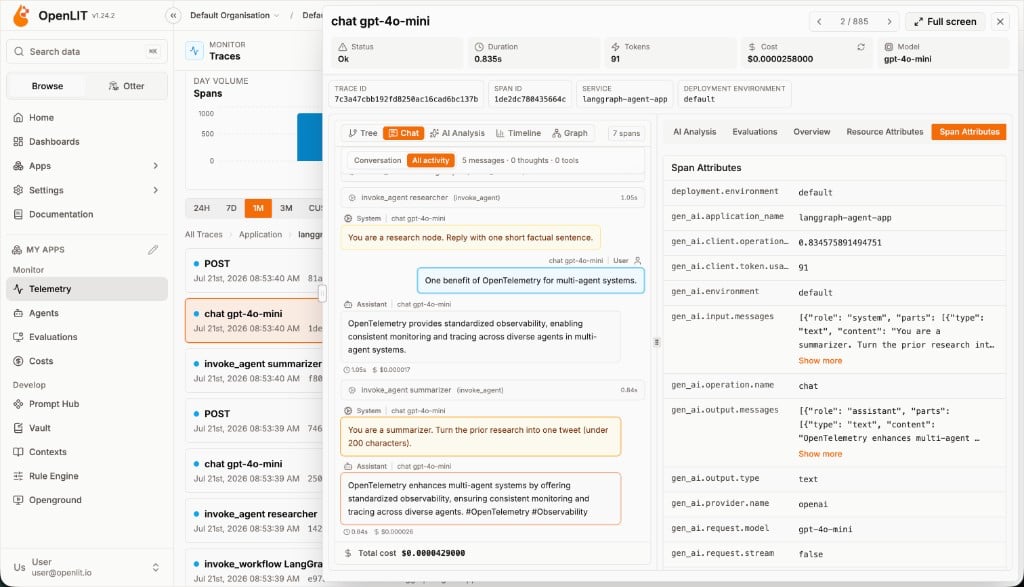
With real-time LLM observability data now flowing to OpenLIT, visualize comprehensive AI performance metrics including token costs, latency patterns, hallucination rates, and model accuracy to optimize your production AI applications.
Just head over to OpenLIT at `127.0.0.1:3000` on your browser to start exploring. You can login using the default credentials
* **Email**: `user@openlit.io`
* **Password**: `openlituser`
You're all set! Your AI applications now have observability with real-time performance monitoring, cost tracking, and AI safety evaluations.
**Send Observability telemetry to other OpenTelemetry backends**
```mermaid theme={null}
flowchart TB;
subgraph " "
direction LR;
ApplicationCode[Application Code] -->|Instrumented with| OpenLIT_SDK[OpenLIT SDK];
OpenLIT_SDK -->|Sends Traces & Metrics| OT_Backend[OpenTelemetry Backend];
end
```
If you wish to send telemetry directly from the SDK to another backend, you can stop the current Docker services by using the command below. For more details on sending the data to your existing OpenTelemetry backends, checkout our [Supported Destinations](/latest/sdk/destinations/overview) guide.
```sh theme={null}
docker compose down
```
If you have any questions or need support, reach out to our [community](https://join.slack.com/t/openlit/shared_invite/zt-2etnfttwg-TjP_7BZXfYg84oAukY8QRQ).
***
Get started with evaluating your LLM responses in 2 simple steps
60+ AI integrations with automatic instrumentation and performance tracking
Create custom visualizations with flexible widgets, queries, and real-time AI monitoring
```mermaid theme={null}
flowchart TB;
subgraph " "
direction LR;
subgraph " "
direction LR;
OpenLIT_SDK[OpenLIT SDK] -->|Sends Traces & Metrics| OTC[OpenTelemetry Collector];
OTC -->|Stores Data| ClickHouseDB[ClickHouse];
end
subgraph " "
direction RL;
OpenLIT_UI[OpenLIT] -->|Pulls Data| ClickHouseDB;
end
end
```
```shell theme={null}
git clone git@github.com:openlit/openlit.git
```
From the root directory of the [OpenLIT Repo](https://github.com/openlit/openlit), Run the below command:
```shell theme={null}
docker compose up -d
```
Prefer Kubernetes, or already have ClickHouse/OpenTelemetry Collector running? See [Self-Host OpenLIT](/latest/openlit/installation) for Helm charts and other deployment options.
```shell theme={null}
pip install openlit
```
```shell theme={null}
npm install openlit
```
```python theme={null}
import openlit
openlit.init(otlp_endpoint="http://127.0.0.1:4318")
```
Examples:
```python OpenAI theme={null}
from openai import OpenAI
import openlit
openlit.init(otlp_endpoint="http://127.0.0.1:4318")
client = OpenAI(
api_key="YOUR_OPENAI_KEY"
)
chat_completion = client.chat.completions.create(
messages=[
{
"role": "user",
"content": "What is LLM Observability?",
}
],
model="gpt-3.5-turbo",
)
```
```python Anthropic theme={null}
import os
from anthropic import Anthropic
import openlit
openlit.init(otlp_endpoint="http://127.0.0.1:4318")
client = Anthropic(
# This is the default and can be omitted
api_key=os.environ.get("ANTHROPIC_API_KEY"),
)
message = client.messages.create(
max_tokens=1024,
messages=[
{
"role": "user",
"content": "Hello, What is LLM Observability?",
}
],
model="claude-3-opus-20240229",
)
```
```python Cohere theme={null}
import cohere
import openlit
openlit.init(otlp_endpoint="http://127.0.0.1:4318")
co = cohere.Client(
api_key="YOUR_API_KEY",
)
chat = co.chat(
message="hello world!",
model="command"
)
```
```python LiteLLM theme={null}
from litellm import completion
import os
import openlit
openlit.init(otlp_endpoint="http://127.0.0.1:4318")
os.environ["HUGGINGFACE_API_KEY"] = "huggingface_api_key"
# e.g. Call 'WizardLM/WizardCoder-Python-34B-V1.0' hosted on HF Inference endpoints
response = completion(
model="huggingface/WizardLM/WizardCoder-Python-34B-V1.0",
messages=[{ "content": "Hello, how are you?","role": "user"}],
api_base="https://my-endpoint.huggingface.cloud"
)
```
```python Langchain theme={null}
from langchain_core.messages import HumanMessage, SystemMessage
import openlit
openlit.init(otlp_endpoint="http://127.0.0.1:4318")
from langchain_openai import ChatOpenAI
model = ChatOpenAI(model="gpt-4o-mini")
messages = [
SystemMessage(content="Translate the following from English into Italian"),
HumanMessage(content="hi!"),
]
model.invoke(messages)
```
```python Ollama theme={null}
import ollama
import openlit
openlit.init(otlp_endpoint="http://127.0.0.1:4318")
response = ollama.chat(model='llama3.1', messages=[
{
'role': 'user',
'content': 'Why is the sky blue?',
},
])
```
Add the following two lines to your application code:
```python theme={null}
import openlit
openlit.init()
```
Run the following command to configure the OTEL export endpoint:
```shell theme={null}
export OTEL_EXPORTER_OTLP_ENDPOINT = "http://127.0.0.1:4318"
```
Examples:
```python OpenAI theme={null}
from openai import OpenAI
import openlit
openlit.init()
client = OpenAI(
api_key="YOUR_OPENAI_KEY"
)
chat_completion = client.chat.completions.create(
messages=[
{
"role": "user",
"content": "What is LLM Observability?",
}
],
model="gpt-3.5-turbo",
)
```
```python Anthropic theme={null}
import os
from anthropic import Anthropic
import openlit
openlit.init()
client = Anthropic(
# This is the default and can be omitted
api_key=os.environ.get("ANTHROPIC_API_KEY"),
)
message = client.messages.create(
max_tokens=1024,
messages=[
{
"role": "user",
"content": "Hello, What is LLM Observability?",
}
],
model="claude-3-opus-20240229",
)
```
```python Cohere theme={null}
import cohere
import openlit
openlit.init()
co = cohere.Client(
api_key="YOUR_API_KEY",
)
chat = co.chat(
message="hello world!",
model="command"
)
```
```python LiteLLM theme={null}
from litellm import completion
import os
import openlit
openlit.init()
os.environ["HUGGINGFACE_API_KEY"] = "huggingface_api_key"
# e.g. Call 'WizardLM/WizardCoder-Python-34B-V1.0' hosted on HF Inference endpoints
response = completion(
model="huggingface/WizardLM/WizardCoder-Python-34B-V1.0",
messages=[{ "content": "Hello, how are you?","role": "user"}],
api_base="https://my-endpoint.huggingface.cloud"
)
```
```python Langchain theme={null}
from langchain_core.messages import HumanMessage, SystemMessage
import openlit
openlit.init()
from langchain_openai import ChatOpenAI
model = ChatOpenAI(model="gpt-4o-mini")
messages = [
SystemMessage(content="Translate the following from English into Italian"),
HumanMessage(content="hi!"),
]
model.invoke(messages)
```
```python Ollama theme={null}
import ollama
import openlit
openlit.init()
response = ollama.chat(model='llama3.1', messages=[
{
'role': 'user',
'content': 'Why is the sky blue?',
},
])
```
```bash theme={null}
# Install OpenLIT
pip install openlit
# Configure via CLI arguments
openlit-instrument \
--service-name my-ai-app \
--environment production \
--otlp-endpoint http://127.0.0.1:4318 \
python your_app.py
```
```bash theme={null}
# Configure via environment variables
export OTEL_SERVICE_NAME=my-ai-app
export OTEL_DEPLOYMENT_ENVIRONMENT=production
export OTEL_EXPORTER_OTLP_ENDPOINT=http://127.0.0.1:4318
# Run with zero code changes
openlit-instrument python your_app.py
```
```typescript theme={null}
import Openlit from "openlit"
Openlit.init({ otlpEndpoint: "http://127.0.0.1:4318" })
```
Examples:
```typescript OpenAI theme={null}
import Openlit from "openlit"
Openlit.init({ otlpEndpoint: "http://127.0.0.1:4318" })
async function main() {
const OpenAI = await import("openai").then((e) => e.default);
const openai = new OpenAI({
apiKey: process.env.OPENAI_API_KEY,
});
const completion = await openai.chat.completions.create({
model: "gpt-3.5-turbo",
messages: [{ role: "user", content: "What is LLM Observability?" }],
});
console.log(completion?.choices?.[0]);
}
main();
```
```typescript Anthropic theme={null}
import Openlit from "openlit"
Openlit.init({ otlpEndpoint: "http://127.0.0.1:4318" })
async function main() {
const Anthropic = await import("@anthropic-ai/sdk").then((e) => e.default);
const anthropic = new Anthropic({
apiKey: process.env.ANTHROPIC_API_KEY,
});
const message = await anthropic.messages.create({
max_tokens: 1024,
messages: [{ role: "user", content: "Hello, What is LLM Observability?" }],
model: "claude-3-opus-20240229",
});
console.log(message);
}
main();
```
```typescript Cohere theme={null}
import Openlit from "openlit"
Openlit.init({ otlpEndpoint: "http://127.0.0.1:4318" })
async function main() {
const { CohereClient } = await import("cohere-ai");
const cohere = new CohereClient({
token: process.env.COHERE_API_KEY,
});
const chat = await cohere.chat({
message: "hello world!",
model: "command",
});
console.log(chat);
}
main();
```
```typescript Langchain theme={null}
import Openlit from "openlit"
Openlit.init({ otlpEndpoint: "http://127.0.0.1:4318" })
async function main() {
const { ChatOpenAI } = await import("@langchain/openai");
const { HumanMessage, SystemMessage } = await import("@langchain/core/messages");
const model = new ChatOpenAI({ model: "gpt-4o-mini" });
const messages = [
new SystemMessage("Translate the following from English into Italian"),
new HumanMessage("hi!"),
];
await model.invoke(messages);
}
main();
```
```typescript Ollama theme={null}
import Openlit from "openlit"
Openlit.init({ otlpEndpoint: "http://127.0.0.1:4318" })
async function main() {
const ollama = await import("ollama").then((e) => e.default);
const response = await ollama.chat({
model: "llama3.1",
messages: [{ role: "user", content: "Why is the sky blue?" }],
});
console.log(response);
}
main();
```
Using static top-level imports instead (e.g. `import OpenAI from "openai"`)? Static imports are hoisted and run before `Openlit.init()`, so the automatic patch can miss the module. Pass it into `instrumentations` so OpenLIT patches it directly:
```typescript theme={null}
import openlit from "openlit"
import OpenAI from "openai"
openlit.init({
otlpEndpoint: "http://127.0.0.1:4318",
instrumentations: {
openai: OpenAI,
}
})
async function main() {
const openai = new OpenAI({
apiKey: process.env.OPENAI_API_KEY,
});
const completion = await openai.chat.completions.create({
model: "gpt-3.5-turbo",
messages: [{ role: "user", content: "What is LLM Observability?" }],
});
console.log(completion?.choices?.[0]);
}
main();
```
The same pattern works for `anthropic`, `cohere`, and `ollama`. LangChain always uses the dynamic-import pattern above, since it patches via a different hook.
Add the following two lines to your application code:
```typescript theme={null}
import openlit from "openlit"
openlit.init()
```
Run the following command to configure the OTEL export endpoint:
```shell theme={null}
export OTEL_EXPORTER_OTLP_ENDPOINT = "http://127.0.0.1:4318"
```
Examples:
```typescript OpenAI theme={null}
import openlit from "openlit"
openlit.init()
async function main() {
const OpenAI = await import("openai").then((e) => e.default);
const openai = new OpenAI({
apiKey: process.env.OPENAI_API_KEY,
});
const completion = await openai.chat.completions.create({
model: "gpt-3.5-turbo",
messages: [{ role: "user", content: "What is LLM Observability?" }],
});
console.log(completion?.choices?.[0]);
}
main();
```
```typescript Anthropic theme={null}
import openlit from "openlit"
openlit.init()
async function main() {
const Anthropic = await import("@anthropic-ai/sdk").then((e) => e.default);
const anthropic = new Anthropic({
apiKey: process.env.ANTHROPIC_API_KEY,
});
const message = await anthropic.messages.create({
max_tokens: 1024,
messages: [{ role: "user", content: "Hello, What is LLM Observability?" }],
model: "claude-3-opus-20240229",
});
console.log(message);
}
main();
```
```typescript Cohere theme={null}
import openlit from "openlit"
openlit.init()
async function main() {
const { CohereClient } = await import("cohere-ai");
const cohere = new CohereClient({
token: process.env.COHERE_API_KEY,
});
const chat = await cohere.chat({
message: "hello world!",
model: "command",
});
console.log(chat);
}
main();
```
```typescript Langchain theme={null}
import openlit from "openlit"
openlit.init()
async function main() {
const { ChatOpenAI } = await import("@langchain/openai");
const { HumanMessage, SystemMessage } = await import("@langchain/core/messages");
const model = new ChatOpenAI({ model: "gpt-4o-mini" });
const messages = [
new SystemMessage("Translate the following from English into Italian"),
new HumanMessage("hi!"),
];
await model.invoke(messages);
}
main();
```
```typescript Ollama theme={null}
import openlit from "openlit"
openlit.init()
async function main() {
const ollama = await import("ollama").then((e) => e.default);
const response = await ollama.chat({
model: "llama3.1",
messages: [{ role: "user", content: "Why is the sky blue?" }],
});
console.log(response);
}
main();
```
Using static top-level imports instead (e.g. `import OpenAI from "openai"`)? Static imports are hoisted and run before `openlit.init()`, so the automatic patch can miss the module. Pass it into `instrumentations` so OpenLIT patches it directly:
```typescript theme={null}
import openlit from "openlit"
import OpenAI from "openai"
openlit.init({
instrumentations: {
openai: OpenAI,
}
})
async function main() {
const openai = new OpenAI({
apiKey: process.env.OPENAI_API_KEY,
});
const completion = await openai.chat.completions.create({
model: "gpt-3.5-turbo",
messages: [{ role: "user", content: "What is LLM Observability?" }],
});
console.log(completion?.choices?.[0]);
}
main();
```
The same pattern works for `anthropic`, `cohere`, and `ollama`. LangChain always uses the dynamic-import pattern above, since it patches via a different hook.
Refer to OpenLIT [Python SDK repository](https://github.com/openlit/openlit/tree/main/sdk/python) or [Typescript SDK repository](https://github.com/openlit/openlit/tree/main/sdk/typescript) for more advanced configurations and use cases.
With real-time LLM observability data now flowing to OpenLIT, visualize comprehensive AI performance metrics including token costs, latency patterns, hallucination rates, and model accuracy to optimize your production AI applications.
Just head over to OpenLIT at `127.0.0.1:3000` on your browser to start exploring. You can login using the default credentials
* **Email**: `user@openlit.io`
* **Password**: `openlituser`
You're all set! Your AI applications now have observability with real-time performance monitoring, cost tracking, and AI safety evaluations.
**Send Observability telemetry to other OpenTelemetry backends**
```mermaid theme={null}
flowchart TB;
subgraph " "
direction LR;
ApplicationCode[Application Code] -->|Instrumented with| OpenLIT_SDK[OpenLIT SDK];
OpenLIT_SDK -->|Sends Traces & Metrics| OT_Backend[OpenTelemetry Backend];
end
```
If you wish to send telemetry directly from the SDK to another backend, you can stop the current Docker services by using the command below. For more details on sending the data to your existing OpenTelemetry backends, checkout our [Supported Destinations](/latest/sdk/destinations/overview) guide.
```sh theme={null}
docker compose down
```
If you have any questions or need support, reach out to our [community](https://join.slack.com/t/openlit/shared_invite/zt-2etnfttwg-TjP_7BZXfYg84oAukY8QRQ).
***
Get started with evaluating your LLM responses in 2 simple steps
60+ AI integrations with automatic instrumentation and performance tracking
Create custom visualizations with flexible widgets, queries, and real-time AI monitoring